Showing posts with label USD. Show all posts

Thursday, 8 April 2021

Making USD faster and better - Dynamics CRM


USD – Faster load times using the cache.


When the USD application loads various user and configuration settings need to be loaded from the server, this can take time. The load time of USD can be reduced by forcing a local cached of these settings.

The advantage being that the USD application will load faster, the disadvantage being that you’d need to remember to update your USD options to force a refresh of the local data following each change.

NOTEA word of caution, the cache contains USD settings but seems to also hold information from other entities such as the CRM system user. Any changes to a configuration option that directly or indirectly effects the USD operation could mean a refresh is needed.

The process of enabling the cache is a simple one, go to the USD settings and select options.
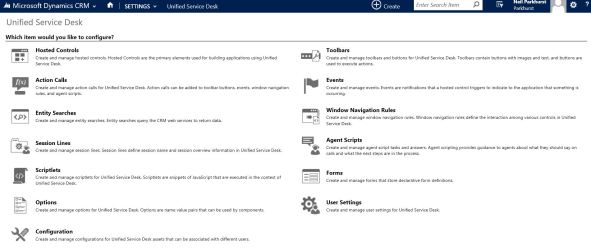
USD Screen

Now add a new user option called “ClientCacheVersionNumber

Cache

The value parameter is used to hold the current version number of your USD application. When a new version is available, increase this value to reflect the change. When USD loads the change in this value will be detected and the USD cached data will be refreshed.

USD Issues and resolution - MS dynamics CRM


HOW TO DELETE USD CACHE TO RECOVER FROM USD ERRORS


In Unified Service Desk, users may encounter errors when using USD, such as pages not loading, custom JavaScript not running etc. These errors may be a result of USD caching.

To delete the USD cache, first browse out to your appdata folder in Windows Explorer. You can access appdata by typing %appdata% in the Windows Explorer navigation bar, which will take you to the user’s AppData\Roaming folder.

Next, delete the following folders, which will be recreated when USD loads:

  • AppData\Roaming\Microsoft\USD
  • AppData\Local\Microsoft\UnifiedServiceDesk

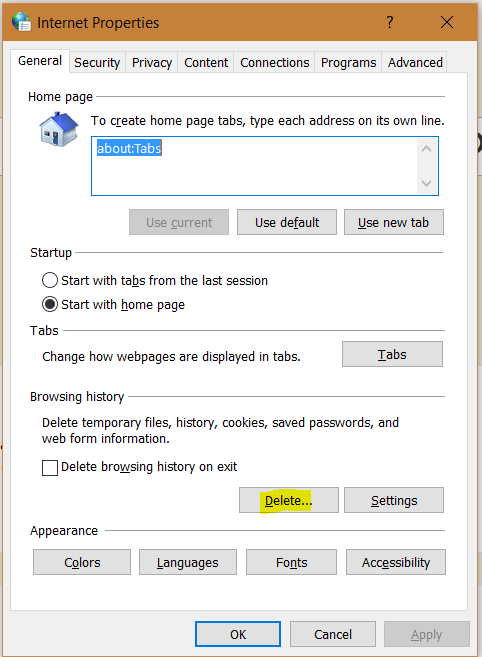
You may also need to delete your IE cache. To do this, from Windows Start go to Internet Options, or from IE, go to Tools->Internet options. Select Delete:

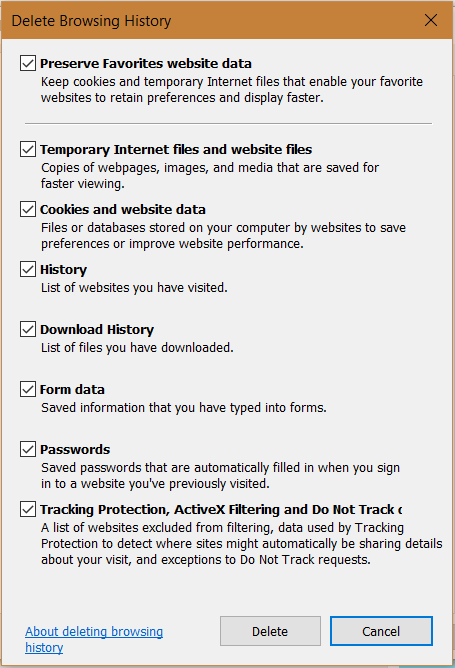
And then Delete:

Identify all the cloudflows on a particular entity along with its messages

  The easiest way to identify the flows that trigger on a particular entity with its messages is to run a SQL query using the sql4cds tool i...